Platform Architecture
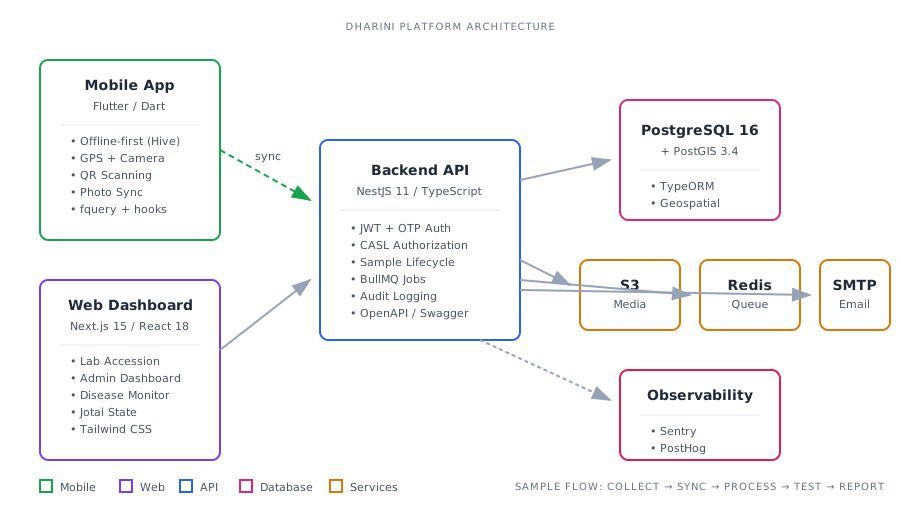
This document summarizes the end-to-end architecture of Dharini, a disease surveillance and sample collection platform. It traces data flow from mobile field collection through laboratory processing to administrative dashboards.
Software Data Flow
Section titled “Software Data Flow”Field Collection (Mobile)
Section titled “Field Collection (Mobile)”The mobile app (Flutter/Dart) operates in an offline-first mode. Field collectors authenticate via OTP, select or create collection sites, and record visits with associated samples.
Collection Flow:
Login (OTP) → Site Selection/Creation → Visit Creation → Sample Collection → Submission-
Site Management: Collectors select nearby sites (cached locally) or create new ones with GPS coordinates. Sites link to projects and diseases under surveillance.
-
Visit Creation: Each visit captures surveillance type, scheduled date, and site reference. Visits transition through statuses:
UPCOMING→COMPLETED. -
Sample Recording: For each sample, collectors:
- Scan barcode (with optional replicates, up to 3 per sample)
- Capture photos (compressed to 1MB, max 1920px)
- Select sample type and associated diseases
- Fill disease-specific questionnaires (configured per project)
- Add comments
-
Local Persistence: Data is stored in Hive boxes before sync:
pendingSubmissions: Queue of visits awaiting uploadcompletedVisits: Offline visit display cachephotoUploadMappings: Local path → S3 URL mappingsvisitIdMap/siteIdMap: Local ID → server ID resolution
-
Sync Pipeline: When online,
SyncServiceexecutes:- Sync locally-created sites and visits (establishes server IDs)
- Batch upload photos (groups of 3, concurrent)
- Replace local paths with S3 URLs
- Submit visit payload via
POST /projects/{id}/submit-visit - Clean up local storage and invalidate query caches
Backend Processing
Section titled “Backend Processing”The NestJS backend receives submissions and manages sample lifecycle through laboratory stages.
Sample Status Flow:
PICKED_UP → RECEIVED → PRE_PROCESSED → EXTRACTED → TESTED → TEST_REPORT_GENERATED ↓ (at any stage) REJECTEDEach transition records the responsible user, timestamp, and stage-specific metadata (volumes, storage conditions, extraction kits, etc.).
Key API Endpoints:
| Endpoint | Purpose |
|---|---|
POST /projects/{id}/submit-visit | Mobile submission intake |
GET /projects/{id}/samples | Filtered sample listing |
PATCH /samples/{id} | Status transition & metadata update |
POST /samples/{id}/lab-tests | Create disease-specific tests |
PATCH /samples/{id}/lab-tests | Record test results |
Sample Pooling: Samples can be pooled for batch testing. When parent sample results are recorded, they propagate to pooled children automatically.
Audit Trail: SampleAudit entity captures all changes with user attribution and before/after snapshots.
Laboratory View (Web)
Section titled “Laboratory View (Web)”Lab technicians use the Next.js web app to process samples through a 5-step accession pipeline.
Accession Stages:
- Receiving: Accept/reject samples, record received volume and storage location
- Pre-processing: Document homogenization, filtration, aliquoting steps
- Extraction: Select extraction kit, record volumes used and remaining
- Testing: Assign tests per disease, record Ct values and results (Positive/Negative/Unclear)
- Completion: Generate test reports, upload to S3
Bulk Processing: Lab staff can select multiple samples and process them through a stage simultaneously via the bulk processing modal.
Filtering & Export: Samples are filterable by disease, sample type, status, and date range. CSV export available for reporting.
Admin Dashboard (Web)
Section titled “Admin Dashboard (Web)”Administrators access project-level analytics and management through the manage and monitor views.
Dashboard Components:
- Statistics: Sample counts per pipeline stage, visualized as progress bars
- Project KPIs: Projects grouped by disease, showing location coverage
- Disease Monitoring: Site-wise sample breakdown with test result aggregation
- User Management: Team assignments, role-based permissions
Access Control (CASL):
| Scope | Access Level |
|---|---|
| System | All projects (super admin) |
| Project | Single project (project admin) |
| Team | Team data only (field staff, lab tech) |
Tech Stack & Services
Section titled “Tech Stack & Services”Mobile (/mobile)
Section titled “Mobile (/mobile)”| Layer | Technology |
|---|---|
| Framework | Flutter 3.x, Dart 3.5 |
| State | flutter_hooks, fquery (react-query port) |
| Local DB | Hive (offline-first persistence) |
| HTTP | Dio via es_client (OpenAPI-generated) |
| Routing | go_router |
| Analytics | PostHog, Sentry |
| Location | geolocator |
Backend (/backend)
Section titled “Backend (/backend)”| Layer | Technology |
|---|---|
| Framework | NestJS 11, TypeScript |
| Database | PostgreSQL 16 + PostGIS (TypeORM) |
| Auth | JWT + Passport, OTP via SMS |
| Storage | AWS S3 (LocalStack for dev) |
| Queue | BullMQ (Redis-backed) |
| Nodemailer + Gmail SMTP | |
| Monitoring | PostHog, Sentry |
Web (/web)
Section titled “Web (/web)”| Layer | Technology |
|---|---|
| Framework | Next.js 15 (App Router), React 18 |
| State | Jotai (atomic state management) |
| HTTP | Axios with JWT interceptor |
| Styling | Tailwind CSS |
| Auth | httpOnly cookies (24hr expiry) |
Infrastructure
Section titled “Infrastructure”| Service | Provider |
|---|---|
| Database | AWS RDS (PostgreSQL + PostGIS) |
| File Storage | AWS S3 |
| APK Distribution | Custom Node.js server (/apk-server) |
| CI/CD | GitHub Actions (mobile CI, smoke tests, deploy workflows) |
| Error Tracking | Sentry |
| Analytics | PostHog |
Service Dependencies
Section titled “Service Dependencies”┌─────────────┐ ┌─────────────┐ ┌─────────────┐│ Mobile │────▶│ Backend │────▶│ PostgreSQL ││ (Flutter) │ │ (NestJS) │ │ + PostGIS │└─────────────┘ └──────┬──────┘ └─────────────┘ │ ┌─────────────────┼─────────────────┐ ▼ ▼ ▼ ┌─────────┐ ┌─────────┐ ┌─────────┐ │ S3 │ │ Redis │ │ Gmail │ │ (media) │ │ (queue) │ │ (email) │ └─────────┘ └─────────┘ └─────────┘
┌─────────────┐│ Web │────▶ Backend API (same as mobile)│ (Next.js) │└─────────────┘Document generated from production branch. Last updated: March 2026.